Finance and accounting professionals face consistent set pressures: tight reporting deadlines, large volumes of structured and unstructured data, and an ongoing demand for clear, accurate communication to boards, auditors, and business partners. Microsoft Copilot - integrated across the Microsoft 365 ecosystem - offers a practical means of reducing time spent on routine, high-volume tasks, while freeing professionals to focus on analysis, judgement, and strategy.
What is Microsoft Copilot?
Microsoft Copilot is an AI-powered assistant built into the Microsoft 365 suite - including Word, Excel, PowerPoint, Outlook, and Teams. It is powered by large language models (LLMs) and connected to your organisation's data, enabling it to understand natural language instructions and generate contextually relevant responses across the applications your team already uses every day.
Copilot draws on data accessible within your Microsoft 365 environment - emails, Teams conversations, SharePoint documents, and OneDrive files. Well-configured access controls and clear data governance are therefore prerequisites for both safe and effective use.
How Copilot Works
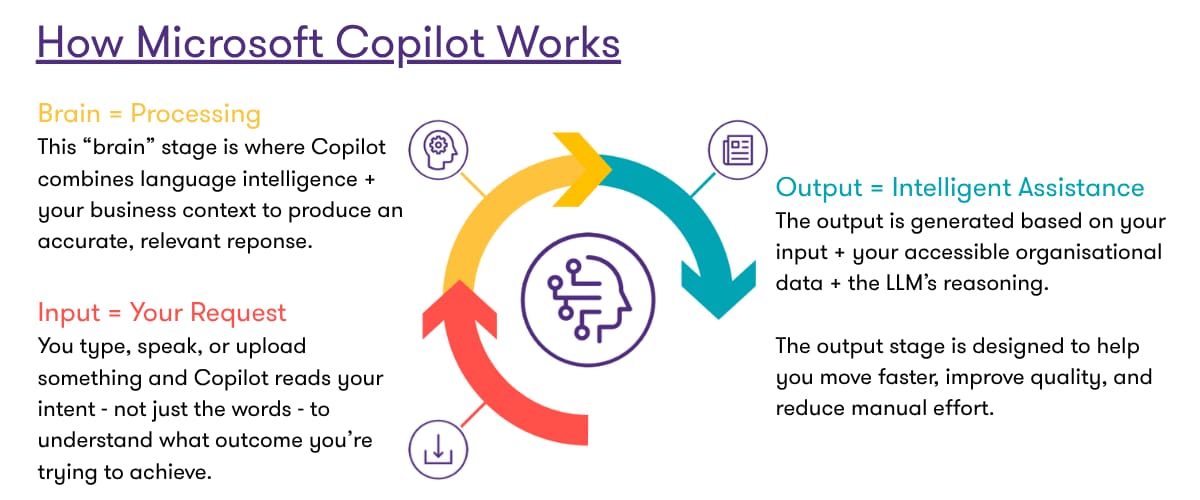
Copilot follows a three-stage process: input, processing, and output.
The quality of the result depends significantly on the clarity and context of the instruction provided. This is why writing effective prompts is a skill worth developing - more on this below.
The Impact on Financial Operations
The question finance leaders most commonly ask is not whether AI works, but how much difference it makes in practice. Research into enterprise Copilot deployment provides a clear answer. Across organisations that have adopted the tool well, users report material improvements across four dimensions that are directly relevant to finance and accounting functions:
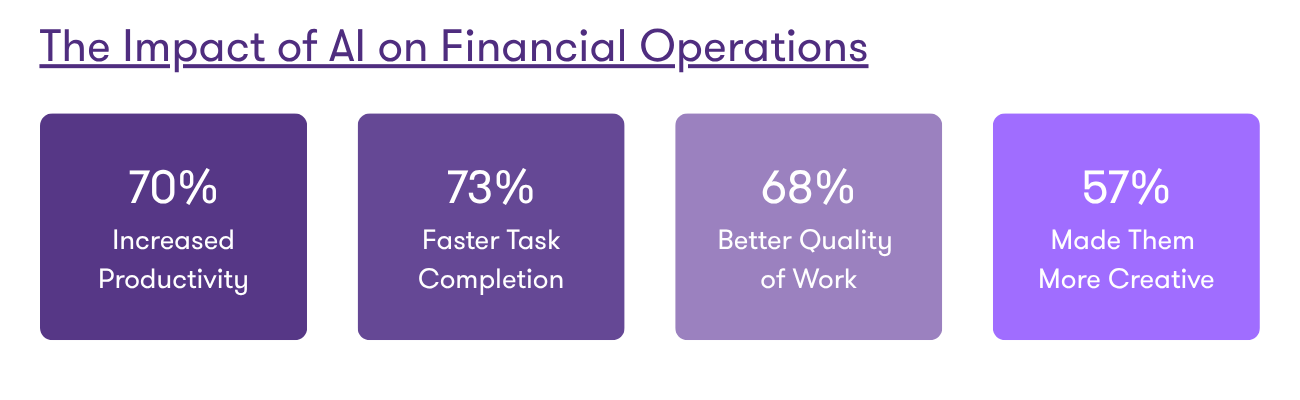 For finance functions where a significant proportion of working time is spent on data gathering, consolidation, document drafting, and stakeholder communication, these figures represent a meaningful operational opportunity. A 73% improvement in task completion speed - applied to month-end reporting or audit preparation - translates directly into capacity for higher-value work.
Core Capabilities
Copilot offers five key functions. For finance and accounting teams, four of these have direct, high-value applications in day-to-day workflows. 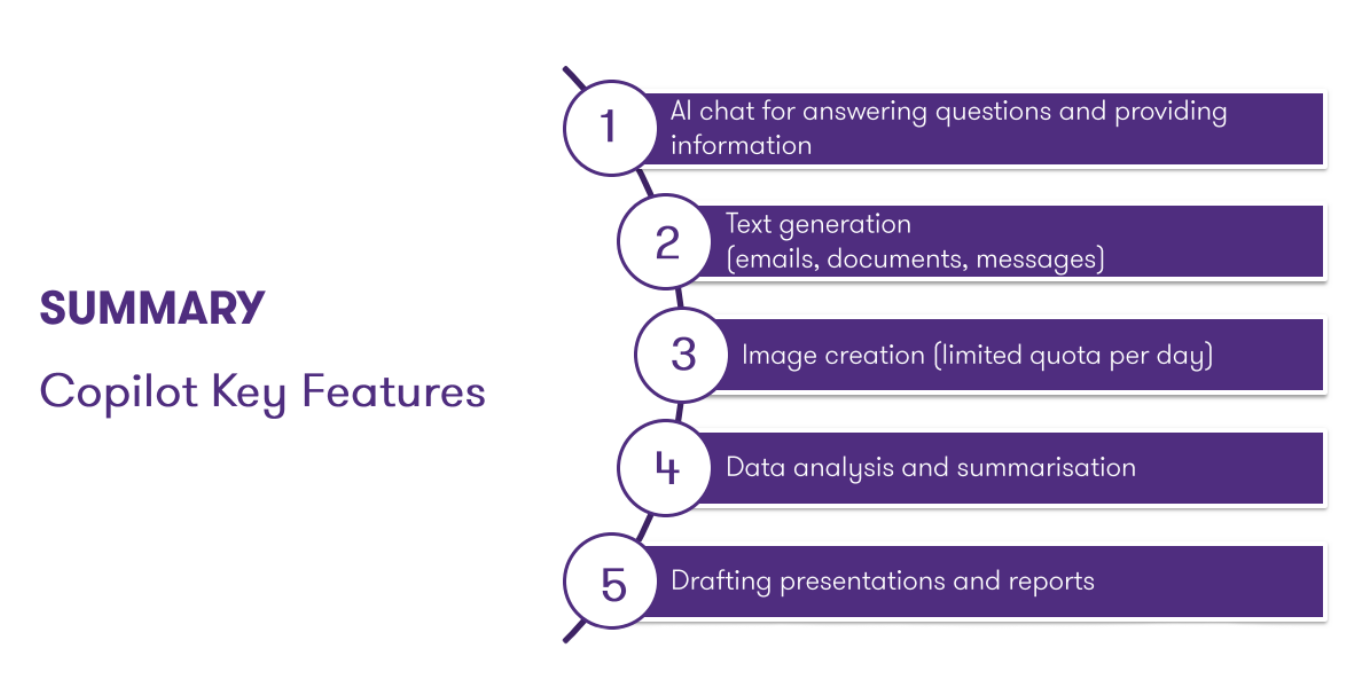 This translates to a wide range of finance-specific tasks:
- Reporting and commentary: Copilot can draft financial and management reports, variance commentary, and executive summaries directly from source data held in Excel or SharePoint, significantly reducing the time spent on month-end production.
- Data analysis: Within Excel, it can analyse large datasets, build and explain formulas, cleanse messy data, and generate scenario models - tasks that would otherwise demand considerable manual effort.
- Reconciliation and review: For reconciliation and document review, Copilot can cross-reference figures and surface discrepancies prior to sign-off.
- Forecasting: In forecasting, it can rapidly generate first-cut projections and scenario narratives ready for senior review.
- Stakeholder communication: Beyond the numbers, Copilot drafts emails, briefing notes, and budget holder updates in a consistent, professional tone.
- Audit documentation: It can also produce working paper narratives and control descriptions to support audit documentation.
The Critical Skill: Writing Effective Prompts
A prompt tells Copilot what you want it to do, so it can give a response that matches your intention. The quality of the prompt is the single most important factor in generating a useful output. Finance and accounting professionals who invest time in developing this skill will see a disproportionate return - and the structure is straightforward once understood.
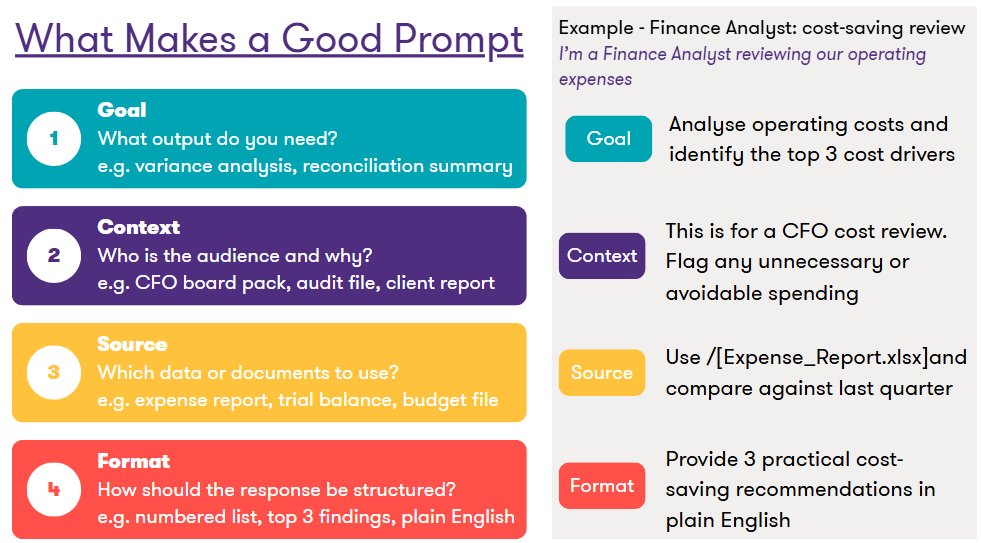
Applying this four-part framework in a finance and accounting context transforms vague instructions into a precise, actionable request. Rather than asking Copilot to "analyse the expenses", a well-structured prompt identifies your role as the preparer, references the specific file such as an expense report or trial balance, defines the intended audience - whether a CFO, audit committee, or client - and requests a specific output such as the top cost drivers or a variance summary. The difference in output quality is substantial, and the approach mirrors the discipline that finance professionals already apply to their work: precision, context, and a clear objective.
Whether you're closing the books, preparing for audit, or briefing the board, Copilot meets you where the work happens - turning Microsoft 365 into a smarter, faster partner for every task on your plate.
For finance and accounting leaders looking to translate these principles into practical application, our upcoming workshop, Empowering Finance & Accounting with Copilot AI, provides a hands-on exploration of real-world use cases, controls, and prompting techniques in finance - delivered in Thai by Grant Thornton AI and Microsoft experts.
📅 19 May 2026
🎯 Rated 8.7/10 by previous participants
Seats are limited. Register now: link